


• Home
  • About us
  • Product
  • Services
    • Hearing Aid Dealer in Delhi
      • Digital Hearing Aids In Dwarka
      • Hearing Test In Dwarka
      • Hearing Aid Fitting In Dwarka
      • Audiologist In Dwarka
    • Hearing Aid in Noida
    • Hearing Aid Centre Greater Noida
    • Hearing Aid Centre Ghaziabad
    • Hearing Aid Centre Gurugram
    • Hearing Aid Centre Faridabad
    • Best Hearing Aids Mumbai
    • Best Hearing Aids Patna
    • Best Hearing Aids Chandigrah
    • Best Hearing Aids Varanasi
    • Best Hearing Aids Meerut
  • Hearing Aids
    • Signia Hearing Aid
    • Phonak Hearing Aid
    • Oticon Hearing Aid
    • Resound Hearing Aid
    • Widex Hearing Aid
  • Blog
  • Our Centre Location
  • Contact Us
  • +91 98112 24051/ 98112 24059
  • info@soundrichhearing.com
  • Mon-Sat 10am - 7.30pm
Request Appointment
Asset-2
  • Home
  • About us
  • Product
  • Services
    • Hearing Aid Dealer in Delhi
      • Digital Hearing Aids In Dwarka
      • Hearing Test In Dwarka
      • Hearing Aid Fitting In Dwarka
      • Audiologist In Dwarka
    • Hearing Aid in Noida
    • Hearing Aid Centre Greater Noida
    • Hearing Aid Centre Ghaziabad
    • Hearing Aid Centre Gurugram
    • Hearing Aid Centre Faridabad
    • Best Hearing Aids Mumbai
    • Best Hearing Aids Patna
    • Best Hearing Aids Chandigrah
    • Best Hearing Aids Varanasi
    • Best Hearing Aids Meerut
  • Hearing Aids
    • Signia Hearing Aid
    • Phonak Hearing Aid
    • Oticon Hearing Aid
    • Resound Hearing Aid
    • Widex Hearing Aid
  • Blog
  • Our Centre Location
  • Contact Us
  • Home
  • About us
  • Product
  • Services
    • Hearing Aid Dealer in Delhi
      • Digital Hearing Aids In Dwarka
      • Hearing Test In Dwarka
      • Hearing Aid Fitting In Dwarka
      • Audiologist In Dwarka
    • Hearing Aid in Noida
    • Hearing Aid Centre Greater Noida
    • Hearing Aid Centre Ghaziabad
    • Hearing Aid Centre Gurugram
    • Hearing Aid Centre Faridabad
    • Best Hearing Aids Mumbai
    • Best Hearing Aids Patna
    • Best Hearing Aids Chandigrah
    • Best Hearing Aids Varanasi
    • Best Hearing Aids Meerut
  • Hearing Aids
    • Signia Hearing Aid
    • Phonak Hearing Aid
    • Oticon Hearing Aid
    • Resound Hearing Aid
    • Widex Hearing Aid
  • Blog
  • Our Centre Location
  • Contact Us
Asset-2
  • Home
  • About us
  • Product
  • Services
    • Hearing Aid Dealer in Delhi
      • Digital Hearing Aids In Dwarka
      • Hearing Test In Dwarka
      • Hearing Aid Fitting In Dwarka
      • Audiologist In Dwarka
    • Hearing Aid in Noida
    • Hearing Aid Centre Greater Noida
    • Hearing Aid Centre Ghaziabad
    • Hearing Aid Centre Gurugram
    • Hearing Aid Centre Faridabad
    • Best Hearing Aids Mumbai
    • Best Hearing Aids Patna
    • Best Hearing Aids Chandigrah
    • Best Hearing Aids Varanasi
    • Best Hearing Aids Meerut
  • Hearing Aids
    • Signia Hearing Aid
    • Phonak Hearing Aid
    • Oticon Hearing Aid
    • Resound Hearing Aid
    • Widex Hearing Aid
  • Blog
  • Our Centre Location
  • Contact Us
  • Home
  • About us
  • Product
  • Services
    • Hearing Aid Dealer in Delhi
      • Digital Hearing Aids In Dwarka
      • Hearing Test In Dwarka
      • Hearing Aid Fitting In Dwarka
      • Audiologist In Dwarka
    • Hearing Aid in Noida
    • Hearing Aid Centre Greater Noida
    • Hearing Aid Centre Ghaziabad
    • Hearing Aid Centre Gurugram
    • Hearing Aid Centre Faridabad
    • Best Hearing Aids Mumbai
    • Best Hearing Aids Patna
    • Best Hearing Aids Chandigrah
    • Best Hearing Aids Varanasi
    • Best Hearing Aids Meerut
  • Hearing Aids
    • Signia Hearing Aid
    • Phonak Hearing Aid
    • Oticon Hearing Aid
    • Resound Hearing Aid
    • Widex Hearing Aid
  • Blog
  • Our Centre Location
  • Contact Us
Hearing Aid  ·  Signia Hearing Aids

How Signia App Settings Can Improve Hearing in Noisy Environments

By Soundrich Hearing 

Hearing comfortably in a busy restaurant, crowded meeting room, shopping centre, family gathering or outdoor event can be challenging even with advanced hearing aids. The difficulty is not simply the loudness of the environment. Conversations compete with multiple sound sources, voices arrive from different directions, and sudden background sounds can make speech less distinct.

The Signia app provides practical controls that can help us adapt compatible Signia hearing aids to changing listening environments. Used correctly, these controls allow us to alter how the hearing aids handle speech, background noise, directionality and overall sound without repeatedly changing the main volume.

The most effective approach is to work through the available adjustments in a logical sequence, beginning with the hearing-aid programme and moving towards more personalised adjustments when necessary.

1. Change the Hearing Programme Before Adjusting Volume

When we enter a noisy environment, increasing the volume is often the least useful first step. Raising volume can make the speaker louder, but it can also make competing sounds louder. The result may be more amplification without better speech understanding.

Compatible Signia hearing aids can be configured with different listening programmes for different acoustic situations. Depending on the hearing-aid model and individual fitting, these may include an automatic or universal programme alongside programmes designed for particular listening conditions.

Through the Signia app, we can select the appropriate programme when our hearing aids support programme control.

Why Programme Selection Matters

A programme can change several aspects of hearing-aid processing simultaneously. Depending on the model and fitting, this may influence:

  • Microphone directionality
  • Background-noise management
  • Speech enhancement
  • Sound balance
  • Compression behaviour
  • Environmental adaptation
  • Overall listening comfort

This makes programme selection considerably different from simply increasing or decreasing volume.

For example, when sitting across a restaurant table from another person, a programme configured for speech in noise may provide a more appropriate starting point than manually increasing amplification.

How to Switch Programmes in the Signia App

The exact interface can vary according to the Signia app version, hearing-aid model and configuration. In general, we can:

  1. Open the Signia app.
  2. Connect the hearing aids if they are not already connected.
  3. Locate the programme or listening-mode controls.
  4. Select the programme appropriate for the current environment.
  5. Listen for several moments before making additional changes.

If only one programme is available, additional programmes may not have been configured during the hearing-aid fitting. An audiologist can determine whether additional listening programmes would be appropriate.

2. Use Speech Enhancement Features When Conversation Becomes Difficult

Once an appropriate programme has been selected, the next priority is speech intelligibility.

Signia hearing systems may provide speech-focused controls such as Speech Boost, depending on the hearing-aid model and software configuration. These features are intended to help when surrounding noise interferes with understanding conversation.

In a crowded setting, the objective is not necessarily to make speech dramatically louder. Instead, we want the hearing aids to provide a more favourable balance between the target speaker and competing sounds.

This distinction is particularly important for people who can hear that someone is talking but struggle to understand the actual words.

When Speech Boost Can Be Useful

Speech-focused adjustment may be particularly helpful in situations such as:

  • Busy restaurants
  • Cafés
  • Family gatherings
  • Office meetings
  • Conferences
  • Shopping centres
  • Public events
  • Social gatherings
  • Group conversations

The benefit can be more noticeable when the speaker’s face is difficult to see or when visual speech cues are limited.

Avoid Using Maximum Speech Enhancement Everywhere

More speech enhancement is not automatically better.

If we use aggressive speech-focused processing in every environment, quiet conversations or soft environmental sounds may not feel as natural. The appropriate setting depends on the acoustic environment and individual hearing needs.

For this reason, we should make adjustments according to the situation rather than permanently selecting the strongest available setting.

3. Adjust Directionality for Conversation Directly in Front of Us

One of the most useful concepts when using hearing aids in noise is directionality.

Hearing aids use their microphones and digital processing to determine where sounds are coming from. Directional processing can place greater emphasis on sounds arriving from a particular direction while reducing the prominence of competing sounds from other directions.

In a restaurant, for example, our conversation partner may be directly opposite us while other conversations are occurring on either side.

A more focused directional setting can therefore be useful when our primary objective is to understand the person sitting directly in front of us.

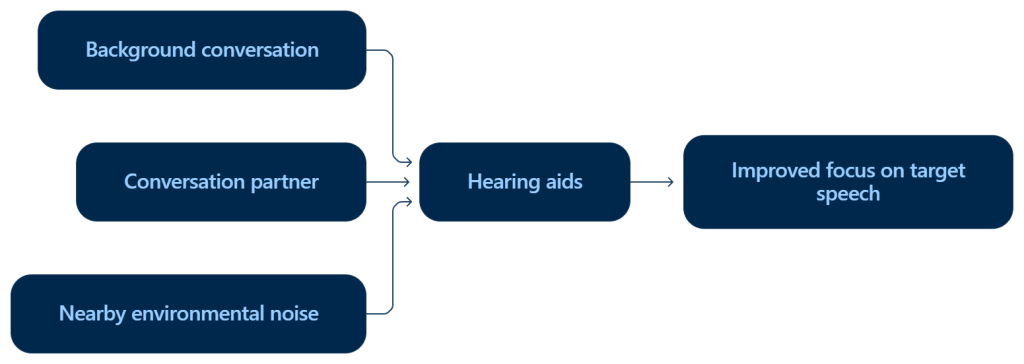
A Simple Restaurant Example

Imagine sitting at a table with a conversation partner:

The microphones cannot make unwanted sound disappear completely. Instead, directional processing and other digital algorithms can alter the relative prominence of sounds.

The Important Directionality Trade-Off

A narrower directional focus can improve attention toward a speaker in front of us, but it may reduce awareness of sounds arriving from the sides or behind.

That distinction matters.

A focused setting may be useful during a face-to-face restaurant conversation, but it may be inappropriate when walking outdoors, crossing a road or moving through an unfamiliar environment where awareness of surrounding sounds is important.

We should therefore treat directional focus as a situational listening adjustment, rather than a setting that should remain permanently activated.

4. Adjust Noise Reduction for Loud Environments

Background-noise management is another important component of comfortable hearing.

Busy environments contain many competing sounds: dishes, cutlery, ventilation systems, traffic, machinery, multiple conversations and intermittent impact noises. Hearing aids use digital processing to distinguish and manage different acoustic signals.

When noise becomes distracting, an appropriate noise-reduction adjustment may make listening more comfortable.

However, maximum noise reduction is not necessarily desirable in every environment.

Loud Environment vs Quiet Environment

In a genuinely noisy location, stronger noise management can help reduce listening fatigue and make the acoustic scene more manageable.

In a quiet environment, excessive processing may make certain low-level environmental sounds feel less prominent than expected.

For example, we may want to remain aware of:

  • A kettle boiling
  • A person approaching from another room
  • A door opening
  • Quiet household conversation
  • Birds or outdoor sounds
  • Soft environmental cues

Consequently, the ideal setting depends on what we are trying to hear at that moment.

5. Use Signia Assistant When Manual Adjustments Are Not Enough

When the standard controls do not adequately address a listening problem, Signia Assistant can provide another level of personalisation on compatible Signia hearing systems.

Rather than experimenting randomly with multiple controls, we can describe the listening difficulty in straightforward terms.

For example:

  • “Speech is unclear.”
  • “The background noise is too loud.”
  • “Voices sound too sharp.”
  • “The room sounds overwhelming.”
  • “I can hear people but cannot understand their words.”
  • “The sound feels uncomfortable.”

The system can then suggest an adjustment based on the reported listening situation.

This can be useful because hearing-aid adjustments are often highly individual. Two people with similar hearing-test results may have different preferences for loudness, clarity, noise management and sound quality.

Make Small, Meaningful Adjustments

When using an app-based adjustment system, we should listen carefully after each change.

Instead of repeatedly changing several settings at once, it is usually easier to determine what works when we make one adjustment, listen for a short period and then decide whether another change is necessary.

This creates a clearer relationship between the adjustment and the resulting listening experience.

6. Remember That Signia Assistant Requires Connectivity

Signia Assistant is designed as a connected, cloud-based feature, so access can depend on an internet connection and compatible devices and software.

This means we should not assume that every app function will remain available when the phone is completely offline.

Before travelling, particularly by air, it is sensible to become familiar with the hearing-aid programmes and controls that can be used directly through the hearing aids and app without relying on an online assistant.

The exact functionality available can depend on the hearing-aid model, app version, smartphone and individual configuration.

7. Do Not Keep Making the Same Large Adjustment Every Day

One of the most important signs that an app adjustment may not be the real solution is repeated dependence on the same substantial change.

If we consistently find ourselves:

  • Increasing volume significantly
  • Increasing noise reduction every day
  • Repeatedly changing speech enhancement
  • Constantly correcting sharpness
  • Frequently switching between the same settings
  • Struggling in the same listening environments

then the issue may require professional attention.

An app can provide useful personal adjustments, but it should not replace a proper hearing-aid fitting when the underlying settings are consistently unsuitable.

Our hearing needs can also change over time. Changes in hearing thresholds, listening habits, ear health, hearing-aid technology or the acoustic environments in which we spend most of our time can all affect the fitting experience.

How to Use the Signia App in a Restaurant

Restaurants are among the most demanding environments for hearing-aid users because several people may be speaking simultaneously while background noise comes from many directions.

A practical sequence is:

Step 1: Select the Appropriate Programme

Start with the listening programme configured for speech or noisy environments rather than immediately increasing volume.

Step 2: Position Ourselves Strategically

Whenever possible, sit where the primary speaker is relatively close and directly in front of us. Good positioning can complement the hearing aids’ directional processing.

Step 3: Use Speech-Focused Controls

If speech remains difficult to understand, use an available speech-enhancement feature such as Speech Boost when supported by the hearing-aid system.

Step 4: Increase Noise Management if Necessary

If surrounding noise remains intrusive, make a moderate noise-reduction adjustment.

Step 5: Reassess Before Making Another Change

Listen for several moments. If the sound becomes muffled, unnatural or excessively processed, reverse the last adjustment rather than continuing to increase processing.

Using Signia Hearing Aids in Meetings

Meetings can present a different challenge from restaurants because the speaker may change frequently.

A very narrow directional setting may be helpful when one person is presenting from directly ahead. However, it may become less suitable when several participants are speaking from different locations.

For meetings, we should consider:

  • Where the primary speakers are sitting
  • Whether the room has an amplification or microphone system
  • How much background noise is present
  • Whether we need awareness of people speaking from the sides
  • Whether automatic environmental processing is performing adequately

If difficulty occurs consistently in professional meetings, an audiologist can evaluate the hearing-aid fitting and discuss additional options for challenging listening environments.

Signia App Volume Control vs Programme Selection

These two controls should not be treated as interchangeable.

Adjustment Main purpose Best used when
Volume Changes overall loudness Sound is generally too soft or too loud
Programme Changes a collection of processing settings The listening environment has changed
Speech enhancement Emphasises speech-related processing Speech is difficult to understand in noise
Directionality Changes microphone focus The target speaker is in a predictable direction
Noise reduction Manages distracting background noise Environmental noise is interfering with comfort
Signia Assistant Provides personalised adjustments Manual changes are not solving the problem

The most effective sequence is generally to select the appropriate listening mode first and fine-tune individual controls afterwards.

Why Speech Can Remain Difficult Even When Sounds Are Loud Enough

Hearing loss does not affect every frequency equally. Many people experience greater difficulty hearing certain speech frequencies, particularly those important for distinguishing consonants.

As a result, increasing overall loudness does not necessarily restore speech clarity.

For example, if speech is already sufficiently loud but competing environmental sounds are also amplified, increasing volume may actually make the listening environment more tiring.

Modern hearing aids therefore rely on more than amplification. Digital processing can incorporate directional microphone technology, noise management and speech-oriented processing to make complex acoustic environments more manageable.

This is why selecting the right programme can be more effective than repeatedly turning the volume upward.

When the Signia App Is Not the Solution

App adjustments are useful for day-to-day personalisation, but certain problems require professional assessment.

We should arrange a hearing-aid review if:

  • Speech remains unclear in most environments.
  • One hearing aid sounds substantially different from the other.
  • The hearing aids frequently produce feedback.
  • Sounds consistently seem too sharp or distorted.
  • Noise reduction makes speech sound unnatural.
  • We need major volume changes every day.
  • The hearing aids no longer seem appropriate for our hearing needs.
  • Hearing appears to have changed since the last hearing test.
  • A previously comfortable fitting has suddenly become uncomfortable.

An audiologist can check the hearing thresholds, inspect the devices, review programming parameters and determine whether the fitting remains appropriate.

How to Get Better Results From Signia Hearing Aids

The Signia app works best when we understand the difference between loudness, clarity, noise management and directional focus.

If sound is simply too quiet, volume may be appropriate.

If speech is difficult in a crowded environment, a speech-oriented programme or speech-enhancement control may be more relevant.

If competing sounds are distracting, noise management may help.

If one speaker is directly in front of us, directional processing may provide additional focus.

If none of these adjustments produces consistently comfortable speech understanding, repeatedly changing the app settings is unlikely to address the underlying issue. A professional hearing-aid review can determine whether programming, physical fit, hearing changes or the listening environment needs further attention.

With a properly configured Signia hearing system and sensible use of its available app controls, we can make more informed adjustments when moving between quiet rooms and acoustically demanding environments.

FAQs

1. How does the Signia app help in noisy environments?

The Signia app allows us to adjust compatible Signia hearing aids according to the listening environment. We can select suitable programmes, adjust volume, use speech-focused controls and manage background noise for greater listening comfort.

2. What is the best Signia setting for noisy places?

The most suitable setting depends on the hearing-aid model, individual fitting and environment. A programme designed for speech in noise can be a useful starting point, followed by adjustments to speech enhancement, directionality or noise reduction where available.

3. Should we increase the volume on Signia hearing aids in a noisy restaurant?

Not necessarily. Increasing volume can also increase competing sounds. Selecting an appropriate programme for noisy environments and using speech-focused or noise-management controls may provide better speech understanding than simply making everything louder.

4. What is Speech Boost on Signia hearing aids?

Speech Boost is a speech-focused control available on compatible Signia hearing systems. It is designed to help make speech more prominent when background noise makes conversation difficult to understand.

5. Can the Signia app reduce background noise?

Compatible Signia hearing aids can provide noise-management controls that help reduce the prominence of distracting background sounds. The available controls and their level of adjustment depend on the hearing-aid model and individual fitting.

6. Can Signia hearing aids focus on a person speaking in front of us?

Yes, compatible Signia hearing aids can use directional microphone technology and related processing to focus more strongly on sounds coming from a particular direction. This can be useful during face-to-face conversations in noisy environments.

7. Why is speech still unclear even when the hearing aids are loud enough?

Speech clarity does not depend only on loudness. Hearing loss can affect the frequencies needed to distinguish speech sounds, while competing background noise can mask important speech information. Hearing-aid programming and appropriate directional and noise-management settings can therefore be important.

8. Does Signia Assistant work without the internet?

Signia Assistant is a cloud-based feature, so an internet connection may be required. Availability and functionality can vary depending on the hearing-aid model, app version and connected device.

9. Why do we need to keep adjusting our Signia hearing aids every day?

Frequent major adjustments may indicate that the hearing-aid fitting needs professional review rather than simply requiring more app changes. An audiologist can assess hearing levels and review the hearing-aid programming to identify the underlying issue.

10. Can we use the Signia app while travelling?

The Signia app can be useful while travelling for controlling compatible hearing aids, but specific functions may require connectivity. Before travelling, it is sensible to become familiar with the controls and programmes available directly through the hearing aids.


Leave A Reply Cancel reply

Your email address will not be published. Required fields are marked *

*

*

Easy-to-Use Hearing Aids: Features That Make Everyday Hearing Simpler
Previous Article
  • Archives

    • September 2026
    • August 2026
    • July 2026
    • June 2026
    • May 2026
    • April 2026
    • March 2026
    • February 2026
    • January 2026
    • December 2025
    • November 2025
    • October 2025
    • September 2025
    • August 2025
    • July 2025
    • June 2025
    • May 2025
    • April 2025
    • March 2025
    • February 2025
    • January 2025
    • December 2024
    • November 2024
    • October 2024
    • September 2024
    • August 2024
    • July 2024
    • June 2024
    • May 2024
    • April 2024
    • March 2024
    • February 2024
    • January 2024
    • December 2023
    • November 2023
    • October 2023
    • September 2023
    • August 2023
    • July 2023
    • April 2023
    • March 2023
    • February 2023
    • January 2023
    • December 2022
    • October 2022
    • April 2019


Request Appointment

If you're struggling to hear, don't wait any longer. Request an appointment for sound aid hearing today and get the help you need.
Get In Touch

We help our clients hear again

We are driven by the values of customer centricity and integrity. We will always have your best interests in our heart while dealing with you.

Read More
Facebook Instagram Linkedin Google

Explore

Home
About Us
Product
Services
Learn
Centre Location
Contact

Other Links

Disclaimer
Privacy Policy
Terms of Service

Soundrich Hearing Pvt. Ltd.

Dwarka

Flat No. 63, Ground Floor,
Sunview Apartment, Pocket-4,
Sector-11, Dwarka,
New Delhi – 110075

Uttam Nagar

info@soundrichhearing.com

E-9, Flat No. – 101,
Om Vihar Extension, Uttam Nagar,
Delhi – 110059

Janakpuri

Shop No. 1/105, Block C4E,
Near C4E Bus Stop,
Janakpuri,
New Delhi – 110058

Copyright 2026 to Soundrich Hearing All Right Reserved | Designed & Developed By Soundrich Hearing